Category: Electric Transfer Chair
Posted by 2026-01-08 10:01
hoyer lift remote control
Hoyer Lift Remote Control: Fingertip Control for Safe Transfers
In the operation of modern Hoyer Lifts, a seemingly small yet crucial component is quietly transforming caregiving methods—the Remote Control. It is not just the "on/off switch" for electric lifts, but also a core tool that enables single-person operation, enhances precision, and ensures patient safety. With a gentle press, caregivers can complete lifting, pausing, and even emergency braking, making the once laborious transfer process calm and manageable.
However, the value of the remote control goes far beyond "convenience." Its design details, usage specifications, and maintenance status are directly related to the safety of every transfer. This article will delve into the functional features, correct usage methods, common issues, and safety recommendations of Hoyer Lift remote control, helping caregivers truly master this "safety device at their fingertips."
I. Core Functions of the Remote Control: More Than Just "Up" and "Down"
Most Hoyer Lift remote controls adopt a simple ergonomic design, typically including the following key buttons:
Up Button: When pressed, the lifting arm rises steadily. The speed is controlled by the motor to avoid startling the patient with sudden starts;
Down Button: Controls slow descent. Some high-end models support a "soft descent mode" to further improve comfort;
Emergency Stop Button: Usually a prominent large red button. Pressing it immediately cuts off power and forces the device to stop all movements;
Power Indicator Light or Battery Display: Some intelligent remote controls are equipped with LED lights or small screens to show remaining battery power or error codes.
Notably, all legitimate remote controls feature "zero-speed start" and "stop-on-release" functions—meaning the device only operates when the button is held down continuously. Once the button is released, lifting or lowering pauses immediately. This design greatly reduces the risk of misoperation.
II. Why Is the Remote Control Critical for Safety?
Free Up Hands to Focus on the Patient
When using the remote control, caregivers do not need to bend over to operate the lift’s main control panel. They can stand beside the patient throughout the process, using one hand to stabilize the patient’s torso and the other to control lifting. This is particularly crucial in narrow spaces or when the patient is uncooperative.
Enable Precise Positioning
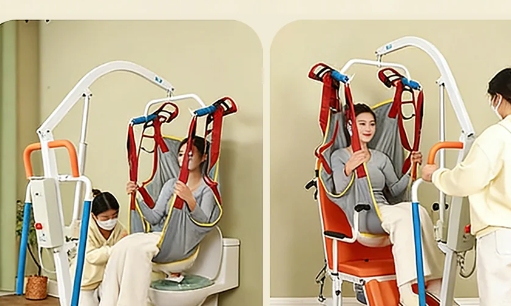
When moving the patient to a toilet or shower chair, fine-tuning the height is often necessary. hoyer lift remote control The remote control allows "jog operation"—a light press lifts or lowers the lift by a few centimeters—ensuring the patient’s hips align accurately with the seat and avoiding slips or collisions.
Rapid Response to Emergencies
If the patient complains of pain mid-air, experiences spasms, or the device shakes abnormally, the caregiver can press the emergency stop button instantly to prevent the situation from worsening. This "second-level response" is an advantage that manual hydraulic devices cannot match.
Support Safe Single-Person Operation
It is the remote control that makes electric Hoyer Lifts truly "single-person assistive devices," significantly reducing the burden on family caregivers. This is especially meaningful for elderly spouses or those with limited physical strength.
III. Key Points for Correct Remote Control Usage
Confirm Sufficient Battery Power Before Use
Low battery power may cause the lift to stop midway. It is recommended to check the indicator light before each use. hoyer lift remote control If the remote control shows no display, try replacing the CR2032 button battery (universal for most models).
Keep Buttons Clean and Dry
Sweat, disinfectant, or dust may seep into the gaps of the buttons, causing poor contact. Wipe with a slightly damp soft cloth—do not soak the remote control or spray liquid directly on it.
Do Not Twist or Pull the Cable (Wired Remote Controls)
Some older models use wired remote controls, with cables typically 1.5–2 meters long. Avoid knotting, stepping on, or over-bending the cable to prevent internal wire breakage.
Be Aware of Signal Interference for Wireless Remote Controls
Although most use dedicated radio frequencies (not Bluetooth/WiFi), hoyer lift remote control they may temporarily fail in strong electromagnetic environments (e.g., near microwaves or large motors). If this occurs, immediately use the backup control panel on the lift body.
Manual Reset Required After Emergency Stop
After pressing the emergency stop button, the device will power off and lock. The button must be rotated clockwise (usually with force) to reactivate it, preventing accidental restoration of operation.
IV. Common Issues and Solutions
Remote Control Is Unresponsive
First, check if the battery is dead; second, confirm the main unit’s power is on; if still unresponsive, try using the main control panel. If both fail, the receiving module may be faulty—contact repair services.
Buttons Are Stuck or Unresponsive
This is often caused by liquid seepage or dust accumulation. Gently tap the remote control to try resetting it, but if the issue persists, stop using it and replace it to avoid uncontrolled lifting/lowering.
Short Remote Range (Wireless Models)
The normal effective range is 3–5 meters. If it shortens significantly, the antenna may be damaged or the battery voltage may be low.
Accidental Press of the Emergency Stop Button
To prevent accidental pressure in pockets, some new models design the emergency button with a "press + rotate" dual operation. Familiarize yourself with the specific mechanism before use.
V. Remote Control Maintenance and Replacement
Regular Inspection: Test all button functions monthly to ensure sensitive response;
Prevent Dropping: The internal circuit board of the remote control is fragile—dropping it from a height can easily cause solder joint breakage;
Prioritize Original Accessories: Remote controls are not universal across brands. Even if the interface is similar, the signal protocol may differ. Always use the model specified by the manufacturer;
Recommend a Backup Remote Control: For institutions with high-frequency use or key home users, an additional backup remote control is recommended to prevent care interruptions due to sudden malfunctions.
Conclusion: A Small Device, a Great Responsibility
Though small, the Hoyer Lift remote control is a bridge connecting technology and humanity. It transforms caregivers from "manual lifters" to "attentive guardians," and patients from "passive recipients" to those "safely supported." Every gentle press is a commitment to safety; every emergency stop is a respect for life.
Remember: No matter how advanced the remote control is, it cannot replace the caregiver’s focus and vigilance. During use, always keep your eyes on the patient and safety at your fingertips.
Because truly safe transfers are never solely the credit of the machine, but a trust story co-written by humans and tools.